We organize how your business runs, then add AI where it saves time.
Scheduling, intake, invoicing, records and reporting, set up and written down so your team can run them. For established businesses and nonprofits, wherever you are. The usual first step is a two-week setup at a fixed price.
When they are out, the work waits. When they leave, it leaves with them.
Information lives in inboxes.
Client details, files and approvals are spread across email, texts and memory.
Admin takes the hours meant for clients.
Booking, invoicing and follow-up fill the week, and the real work moves to evenings.
What we offer
Four ways to work together
01Where to start
The Office Setup
We take the one part of your business that costs you the most time and set it up properly, start to finish, planned for two weeks from the day we have access to your accounts, with the finish date set in writing when you book.
Your real workflow, set up starting with the tools you already have
A dashboard and written instructions your team can follow
AI assistants that take repeat work off your desk, or your team’s. Each has one job and a name. They draft, and you decide what they may finish on their own.
A coordinator that routes every request
Assistants for the inbox, invoices, client updates and records
You set what each one may send on its own
Runs on a paid AI plan in your name, costed before setup
When more of the business needs the same care. Most lines of work start with a paid diagnostic, and the report is yours whether or not more work follows.
Knowledge Core: what your team knows, written down and linked
AI Visibility: what AI assistants tell people about you
Funding registers and grants, for nonprofits
Second Brain: a fixed fee by size, from $2,618 for one person, built on the LH BRAIN method
Six founding places are reserved for organizations based in or primarily serving Montezuma County. Founding clients receive a reduced rate on their first build, quoted during the first call. In return, they agree to participate in a written case study, provide an honest testimonial and make two introductions to organizations that could benefit from our work.
The offer closes on 20 March 2027, at the spring equinox, or when all six places are filled, whichever comes first.
Sized by the work, not the size of your team. Half at signing, half at handoff. We start with the tools you already have. Larger than these limits, we begin with a diagnostic and a fixed quote.
Upkeep, after handoff. A monthly check of each workflow, fixes when something breaks, up to 2 hours of small changes and a short check-in. $450 a month for the Office Setup, $650 for Full, month to month after the first 3 months. Further small changes are $333 an hour, agreed in writing first.
How it works
Planned for two weeks, start to finish
Week one is drawn flat: we map how the work moves and set up the one workflow worth fixing first. Week two lifts it into something that stands without us.
Week one
FIG.Your business at the center, the setup’s six parts around it, lifting into a form that stands on its own.
Before it starts
A 30 minute call
No charge. You tell us what slows the week down, and you'll know by the end of the call whether the setup fits.
One circle: your business, at the center.
Week one
The walkthrough
We walk through how the business runs with you, and find where the hours go.
A second circle, drawn through the first.
Week one
One workflow, set up
The part of the week that costs you the most time, set up start to finish in your own tools. The rest of the plan is drawn around it.
Six around one: the whole setup, on paper.
Week two
The dashboard, and the assistant in Office Setup Full
One screen shows where the work stands. In Office Setup Full, one assistant takes a repeat task, and a person approves everything it produces.
The plan lifts off the page.
Week two
Written down
Instructions your team can follow without us, kept where they will find them.
Written down, so it holds.
Week two
Handoff
It runs in accounts you own. Your team carries it from here, or you choose larger work.
Twelve around one. It stands on its own.
If the walkthrough finds something bigger. The setup still delivers its one workflow. What we found goes into a short written recommendation for larger work, so you can decide on it separately.
Larger work starts with a paid diagnostic. AI Visibility, Knowledge Core and clinical work are priced only after we have seen what is there. The Office Setup includes its own walkthrough.
Everything your business knows, in one place you own
We run LaurelHouse on it
What your business knows, linked to where it’s used.
Every note connects to the clients, decisions and procedures it relates to, so nothing depends on one person remembering. It reads from the tools your business runs on, inside limits you approve.
The Office Setup lays the groundwork. Knowledge Core builds on it.
NotesTopicsNot yet linked
Hover a note to see what it links to.
An illustration modeled on our own working vault. No real notes, names or clients are shown.
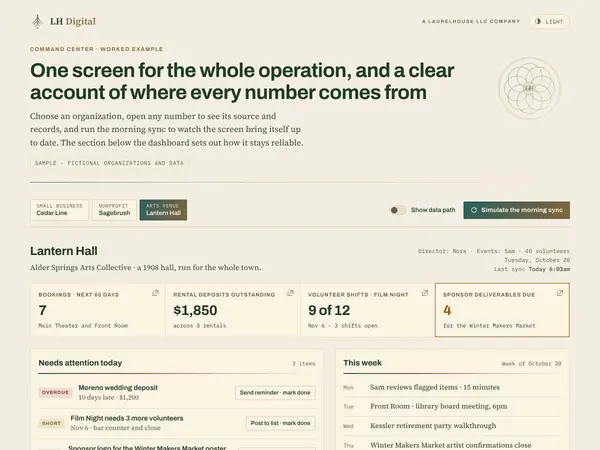
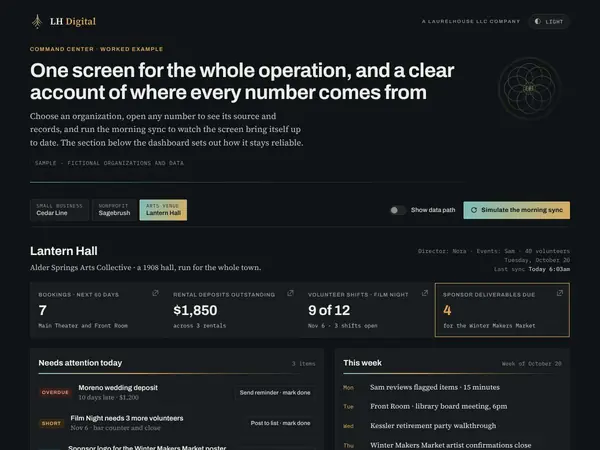
One screen, the whole operation
Part of every setup
The dashboard keeps the record so nobody has to ask around. It reads from the tools your business runs on, and someone on your team can keep it current each week.
Watch it for a moment. Work arrives, waits on a person, and gets done.
See it for
Riverbend Builders
Live example
A person approves everything it produces.
Worked example
Assistants that work alongside you
You set what needs your approval
Six assistants and a coordinator, each with one job and a name you can call.
They take the repeat work off your desk, or your team’s: sorting mail, following up on invoices, drafting client updates. Ask the coordinator, the right assistant drafts the work. You decide which routine tasks each one may finish on its own, and everything else waits for a person to approve it. Start with one, add more as the work grows, and choose the names.
The laurel carries its growth from one season into the next. A house gives what matters a place to stay. We build with both in mind: giving what you know a lasting home in how your business runs, so your work carries forward and grows stronger, season after season.
The Office Setup needs no AI plan. Office Setup Full adds an assistant, which runs on a paid AI plan in your business’s name, such as ChatGPT, Claude, Gemini or Copilot. Some workspace plans already include one. For everything else, we start with the tools you already have. If the work needs something new, the walkthrough sets out your options and what each costs, you choose the path before anything is set up, and you pay the provider directly. We take no commission, referral fee, or affiliate revenue from any tool we recommend, so the recommendation is only ever about what the work needs.
Is the walkthrough extra?
No. Week one is the walkthrough, and it is part of the fixed price.
Who owns what you build?
You do: the accounts, the files and the written instructions. If we host a client portal for you, you receive everything in it at handoff, and we delete our copy within 30 days, except the records we are required to keep, such as invoices.
What if we are not ready for AI?
The Office Setup works without it, and needs no AI plan. The assistant in Office Setup Full is there when you want it.
What happens after handoff?
Your team runs it. If ongoing care makes sense, we scope it then.
How quickly will you reply?
Clients on Upkeep hear back within one business day, Monday to Friday. If a workflow has stopped, such as booking or invoicing, we reply the same business day. A reply means we have looked and set out the next step; larger fixes are scheduled from there.
Start here
Bring the part of the week that costs you the most time.
30 minutes, no charge
Phone or video
Details sent on confirmation
You’ll know whether the setup is a good fit, and where it would help first